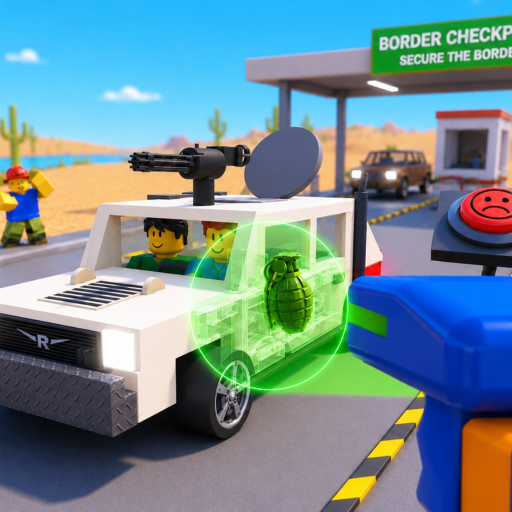
Secure the Border X Ray Vehicle Guide: Careful Scan Steps
Use this Secure the Border X ray vehicle guide to run a careful scan, record current indicators, follow up with physical searches, and avoid false item IDs.
This Secure the Border X ray vehicle guide helps you turn the confirmed scan feature into a cautious evidence step. Run the scan, record the current visual feedback, and use physical searches before converting an unclear shape into an item claim.
Evidence note: Vehicle X-rays are officially confirmed, but the evidence packet does not contain a complete indicator legend, color meaning, item silhouette list, scan control, timing rule, or automatic-decision policy.
The walkthrough below is useful for visual orientation. Treat it as a dated player demonstration, not proof of exact current scan indicators.
Open the official Secure the Border Roblox experience to verify the current scan interaction and game description.
Treat the X-ray as one evidence channel
The official description lists X-ray vehicles alongside trunk and engine searches. That wording supports a connected inspection loop, but it does not prove the scan is a complete substitute for physical searches. Keep the scan result in its own note until the live client gives you a clear follow-up or outcome.
Before scanning, identify the vehicle, open panels, active document screen, and current prompt. A stable starting state makes it easier to determine whether a visual change came from the scan or another interface layer.
Run a four-part scan routine
Use the same routine on several vehicles so an unusual result is easier to recognize without naming it prematurely.
| Part | Action | Record | Avoid |
|---|---|---|---|
| Prepare | Center the vehicle and close unrelated panels | Current prompt and viewing state | Starting from an obstructed or unknown state |
| Scan | Trigger the live X-ray interaction | Exact animation, highlight, shape, color, or message | Assigning an unsupported universal meaning |
| Compare | Check the full visible vehicle area | Location and relationship of each observation | Calling an incomplete view a complete scan |
| Follow up | Use trunk or engine searches when available | Physical result kept in a separate field | Treating a scan as automatic item proof |
| Resolve | Read the current decision feedback | Available action and final response | Inventing a reward, penalty, or hidden score |
The strongest record uses the exact client wording. If there is no label, describe what you saw and where it appeared. “Bright shape near the rear during the scan” is an observation; “confirmed illegal item X” is an identification the evidence may not support.
Interpret feedback without building a fake legend
Repeated observations can help you notice where to look, but they do not establish a permanent official legend. Alpha changes can alter art, vehicle layouts, or feedback. Date each entry and keep “observed,” “confirmed by current game feedback,” and “unresolved” as different states.
Use these confidence levels:
- Observed: A visible scan detail was recorded, but the game did not identify it.
- Followed up: A trunk or engine search produced a related result.
- Client-confirmed: The current interface explicitly labeled or resolved the finding.
- Unresolved: The scan and follow-up did not provide enough information.
Do not add a community video title, thumbnail, or casual nickname to the client-confirmed level. Supporting footage can show what a player saw on a date; it cannot replace the live game response.
Connect the scan to a complete inspection
After the X-ray, return to the broader workflow. Compare documents separately, search the trunk and engine when the live client allows it, and note any bribe, smuggler, or raider prompt without assuming its meaning. The engine search guide provides a physical coverage route.
When the shift becomes harder, resist scanning faster than you can read. The official page confirms rising difficulty but no numeric schedule. A consistent four-part routine is easier to shorten safely: close clutter, scan, mark the location, follow up, and resolve.
If the scan display is hard to read, test one visibility or camera change using the best settings guide. Do not claim a specific graphics option exists unless it appears in your current menu.
Frequently asked questions
How do I X-ray vehicles in Secure the Border?
Approach the current scan station and follow the live interaction prompt for your device. A complete official PC, mobile, tablet, or console binding map was not available.
What do the X-ray colors or shapes mean?
No reliable complete legend was available. Record the exact current feedback and use trunk or engine follow-up rather than assigning an unsupported item name.
Does a clear X-ray mean the whole vehicle is safe?
The evidence does not establish that rule. The official description also confirms document, trunk, and engine checks, so preserve each result as a separate evidence channel.
Can scan indicators change during Alpha?
Yes, update-sensitive visuals and interface details may change. Date the observation and follow the current live client when it differs from an older guide or video.